Skip to content
Use / Commands

Commands

Every squad-chat slash command, what it does, and examples.

Command What it does
/chat Open the pane
/say <message> Send a message to the current room from the prompt
/room List your rooms
/room <name> Switch to a room you’re in (or click its tab)
/room <name> <passcode> Create a room, or join a friend’s
/room leave <name> Leave a room. Rejoin any time with its passcode.
/room delete <name> Delete a room you created, with all its messages, for everyone. Run it twice to confirm.
/who Who’s online, across all your rooms
Command What it does
/chat-login <email>, then /chat-login <code> Sign in by email from the prompt instead of the pane
/chat-login <name> Sign in with just a name, where the server allows it
/chat-name <new name> Change your display name. Your friends see the new one right away.
/chat-logout Sign out on this computer
Command What it does
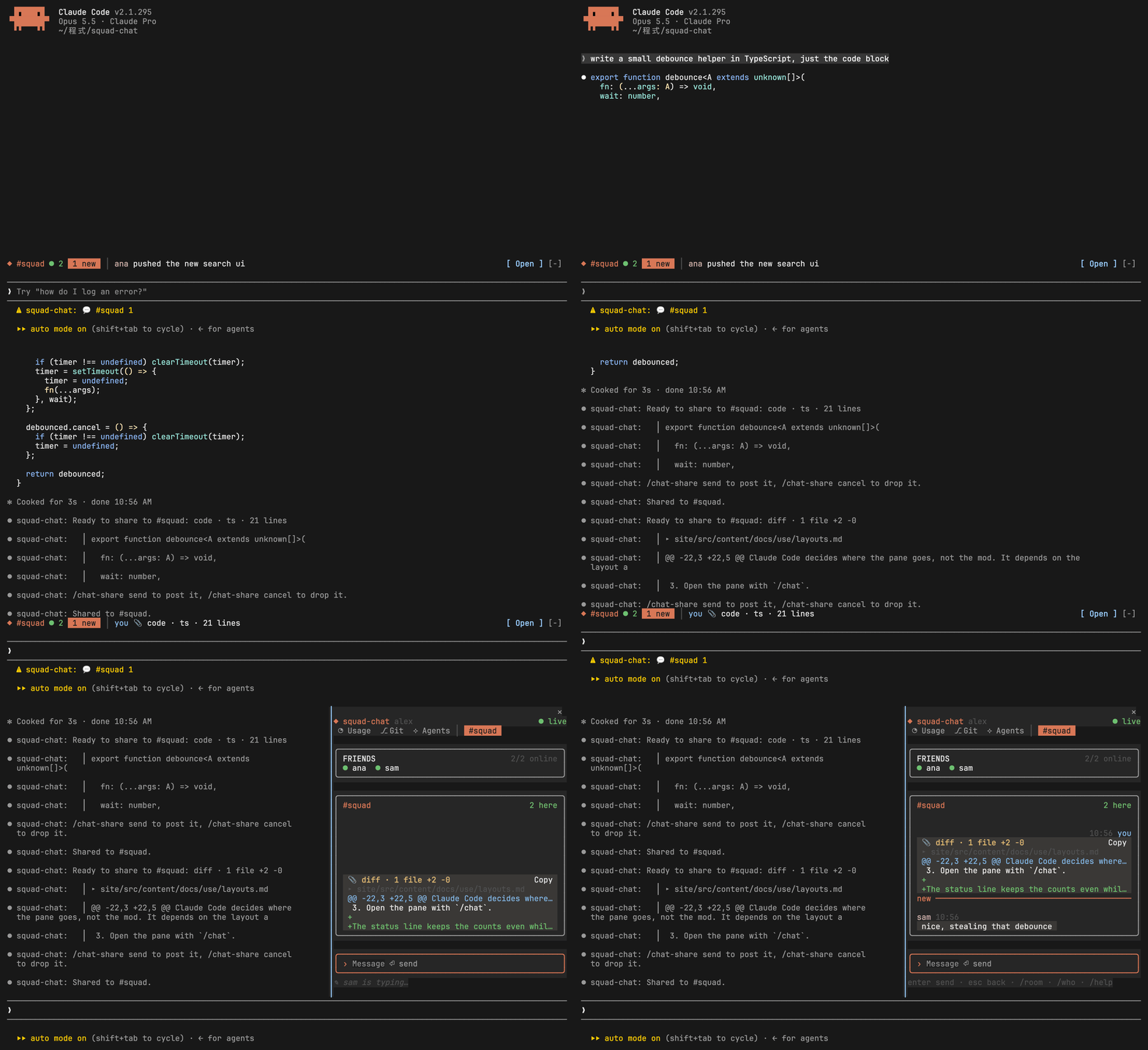
/chat-share [#room] Share the text you selected, or else the last code block in Claude’s reply, to the current room or the one you name. You see it first, then /chat-share send posts it (or /chat-share cancel).
/chat-share diff [path] [#room] Share your uncommitted changes (git diff HEAD), all of them or one file’s
/chat-share to #room Send what’s waiting in the preview to another of your rooms instead. /chat-share send #room picks the room and posts in one go.
/chat-share usage / git / agents / focus / snippet / monitor / weather / news / stock / lofi [#room] Share a snapshot of a built-in room to the current room or the one you name
Command What it does
/snippet add <text> Save the text as a snippet. Snippets are numbered 1, 2, 3 and on
/snippet add Save the text you selected, or else the last code block in Claude’s reply, to the Snippets room
/snippet rename <old> -> <new> / delete <name> Rename or delete a saved snippet
/snippet copy <name> / share <name> [#room] Copy a saved snippet, or share it to a chat room after a look
Command What it does
/lofi play [name] / pause / next / prev / stop / vol <0-100> Drive the Lo-fi room’s player from the prompt
/lofi add <url, file or folder> [# name] / remove <name> / import Add to its list, take one off, or bring in Pixel Play’s playlist
Command What it does
/chat notify on / off Toast when someone writes @yourname (off by default)
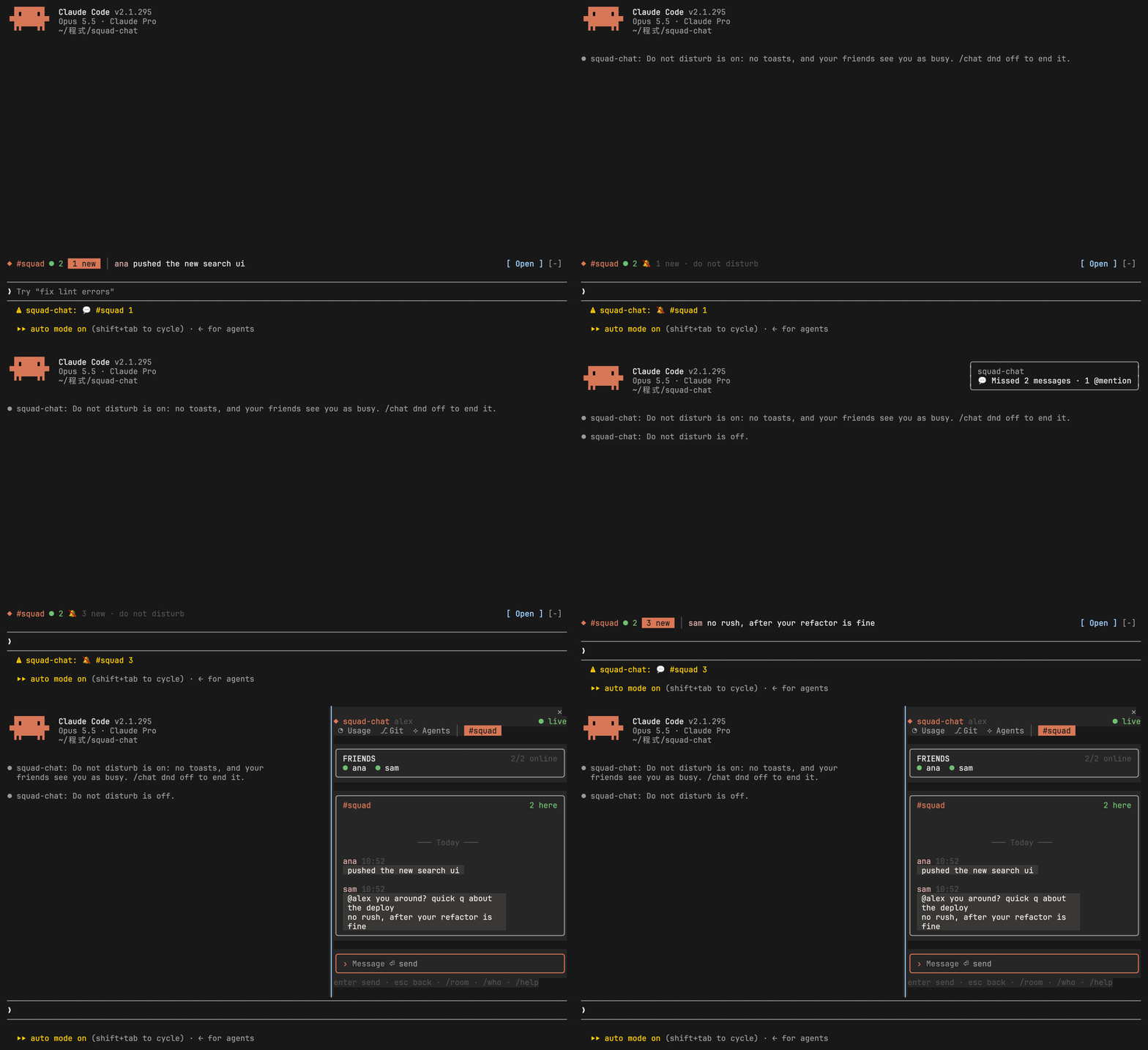
/chat dnd on / off / auto Do not disturb: no toasts, a quiet band and status line, and friends see you as busy. auto turns it on while Claude works on something longer than 30 seconds, then sums up what you missed.
/chat usage / git / agents / focus / clipboard / pet / snippet / monitor / weather / news / stock / lofi Open the pane on a built-in room. /chat chat goes back to the chat.
/chat band [room] Show another room in the band above the prompt without opening the pane. ‹ and › on the band do the same, one room at a time.
/chat rooms <list> Which built-in rooms have tabs: any of usage, git, agents, focus, clipboard, pet, snippet, monitor, weather, news, stock, lofi, or all, or none. +name and -name add or drop one.
/focus start / pause / skip / reset / <focus min> [break min] Drive the Focus room’s timer from the prompt. /focus alone opens the room.
/chat store [words] The rooms in the room store, and which you have
/chat install <id> / update [id] / uninstall <id> Install a room from the store (a look first, then again to install), bring installed ones up to date, or remove one
/chat set <room> [<setting> <value>] Show or change a room’s settings, such as /chat set weather cities Tokyo. A list also takes +one and -one, and default puts a setting back. Some lists, as Weather’s cities, add what’s typed instead of replacing the list.
Command What it does
/chat set weather cities Osaka, Seoul / -Tokyo Add cities, or drop one
/chat set weather city Tokyo / units imperial The city shown below Now, and the units
/chat set news hn best The Hacker News list: top, best, new or off
/chat set news feeds -https://techcrunch.com/feed/ Drop a feed (a feed has to come from one of the room’s sites)
/chat set stock watchlist TAIEX, 2330, AAPL / +2454 / -NVDA The watchlist, up to 12. A Taiwan code, TAIEX, or any Yahoo symbol such as 7203.T
/chat set stock colors red-up / green-up One color rule for every market, instead of each market’s own
/chat set stock move 3 Toast when a stock moves 3% in a day (0 stops it, 5 by default)
/chat set monitor cpu_temp 90 / memory 90 / alerts off Monitor’s thresholds, or no toasts

The pane’s input box takes /room, /who, /name, /dnd, /share, /snippet, /lofi, /set, /usage, /git, /agents, /focus, /clipboard, /pet, /chat (with rooms, set, store, install, update and uninstall), /logout and /help too, where the share preview lets you pick the room and has Send and Cancel buttons. In the Git room and the function rooms, r refreshes, and in Lo-fi single keys drive the player (p play or pause, n next, b back, s stop, u and d volume). In Focus, start, pause, skip, reset or 50 10 drive the timer, and in Pet a mood’s name (wave, sleepy, auto) picks it. In a room with settings, /set <setting> <value> changes one.

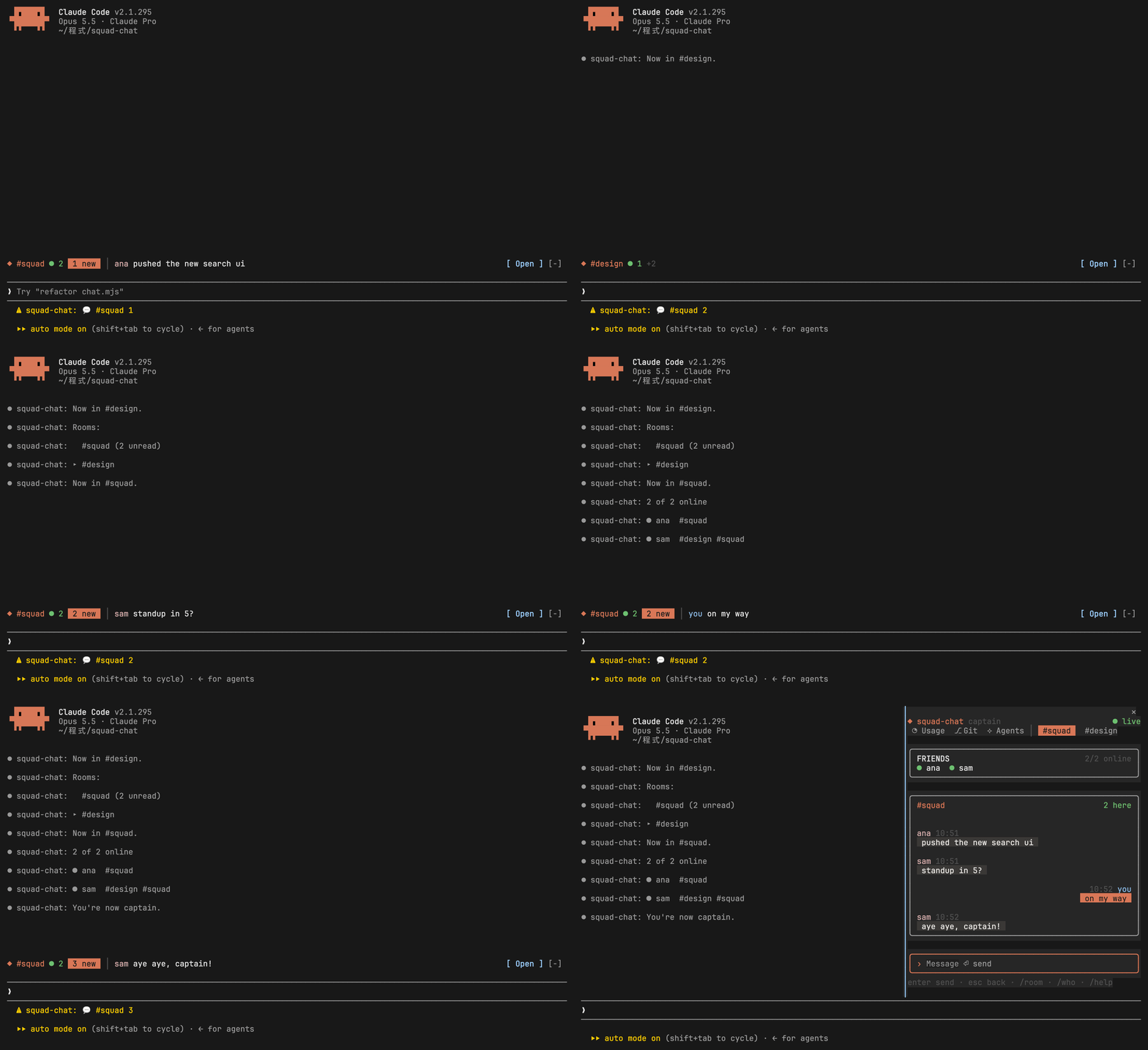
/room design pixels42 create #design (or join it, if a friend made it) with passcode pixels42
/room squad switch to #squad, a room you're already in
/room list your rooms and their unread counts
/say standup in 5? post to the current room without opening the pane
/who who's online, and in which rooms
/chat-name captain show up as captain from now on
From the prompt: /room design pixels42 joins a friend's room, /room lists the rooms with an unread count, /room squad switches back, /say posts a message, /who shows who's online, and /chat-name captain changes the name.
Rooms from the prompt: join with a passcode, list, switch, post with /say, see who's online and pick a new name.
/chat-share the text you selected, or Claude's last code block, to the current room
/chat-share #design the same, to #design
/chat-share diff all your uncommitted changes
/chat-share diff src/a.ts only src/a.ts
/chat-share diff src/a.ts #design
/chat-share send post what the preview showed
/chat-share cancel drop it

If what you share looks like it holds an API key, a token, a private key or a secret from an env file, the preview says so and asks you to send twice.

Claude writes a debounce helper. /chat-share shows a preview of its code block and /chat-share send posts it. /chat-share diff does the same for an uncommitted change. In the pane both appear as cards, the diff colored, and a friend replies.
Sharing Claude's code block and an uncommitted diff: a preview first, then a card in the room.
/chat dnd on no toasts, and friends see you as busy
/chat dnd auto the same, but only while Claude works on something longer than 30 seconds
/chat dnd off back to normal, with one summary of what you missed
/chat notify on a toast when someone writes @yourname
With /chat dnd on, the band above the prompt turns grey and shows a muted count while a friend writes, with no toast. After /chat dnd off, one toast sums up the missed messages and the pane shows them.
Do not disturb: the band stays grey while sam writes, and one toast sums it up after.